BorrelliCurved-Glass Countertop DisplayUser Manual
Written and approved by Borrelli for safe use.
Important safety and compliance guidance.
Local experts ready to help.
01Warnings and Safety
These precautions ensure safe, correct use of the cold display and minimise the risk of injury or damage.
Electrical safety
- Do not damage the refrigerant circuit.
- The LED lights must be replaced by a qualified person — contact the customer helpline.
- Do not use electrical appliances inside the food storage compartment.
- Dispose of the unit only at an authorised waste centre; do not expose it to a flame.
- All repairs, disassembly or modification must be performed by a qualified technician.
- The expected noise level of the unit is 55 dB.
Ventilation
- Keep all ventilation vents clear while the unit is operating.
- Do not let crumbs/food go down or in the internal vents, this will clog your drain and damage your unit.
- Do not use mechanical devices to accelerate defrosting unless recommended by the manufacturer.
Servicing
- Do not store explosive substances such as aerosol cans with flammable propellant in this appliance.
- Disconnect the unit from power before cleaning, maintenance or replacing parts.
Restart delay
- Never place heavy objects or items containing water on top of the unit.
Additional precautions
- Do not damage, modify or excessively bend the power cord; if damaged, a qualified technician must replace it.
- Use a dedicated wall outlet; do not use flammable sprays or substances near the unit.
- Do not insert anything (fingers, sticks, etc.) into the cold air suction outlet.
02Installation
Before use
- Remove all packaging and leave the door open to ventilate.
- Clean the unit before use.
- Run the unit empty for an hour before loading stock.
Placement and clearances
- Indoor use only; keep out of direct sunlight, rain and weather.
- Install on a flat, stable, level surface strong enough to support the unit when loaded.
- Allow a 100 mm gap on all sides and at the rear for airflow and ventilation.
- Site the unit away from doorways, fans and air-conditioning drafts.
03Cleaning and Maintenance
Exterior and interior
- For dust, wipe inside and out with a dry cloth.
- For a deeper clean, use a mild detergent and a soft cloth.
- Clean the unit regularly.
- Never use polishing powder, soap powder, benzine, oil or hot water — these damage the paint and plastic.
After cleaning, check the power cord for cracks or damage. If you find any, contact Borrelli.
Condenser maintenance
Every few monthsThe condenser is located behind an access cover at the rear of the fridge. Switch off and unplug the unit before carefully removing the cover, then clear dust and debris from the condenser with a soft brush.
Clean it every few months, or more often in dusty or high-use environments. Refit the access cover securely when finished.
04How to Use
Please note: this is a refrigerated cold display, not a household fridge.
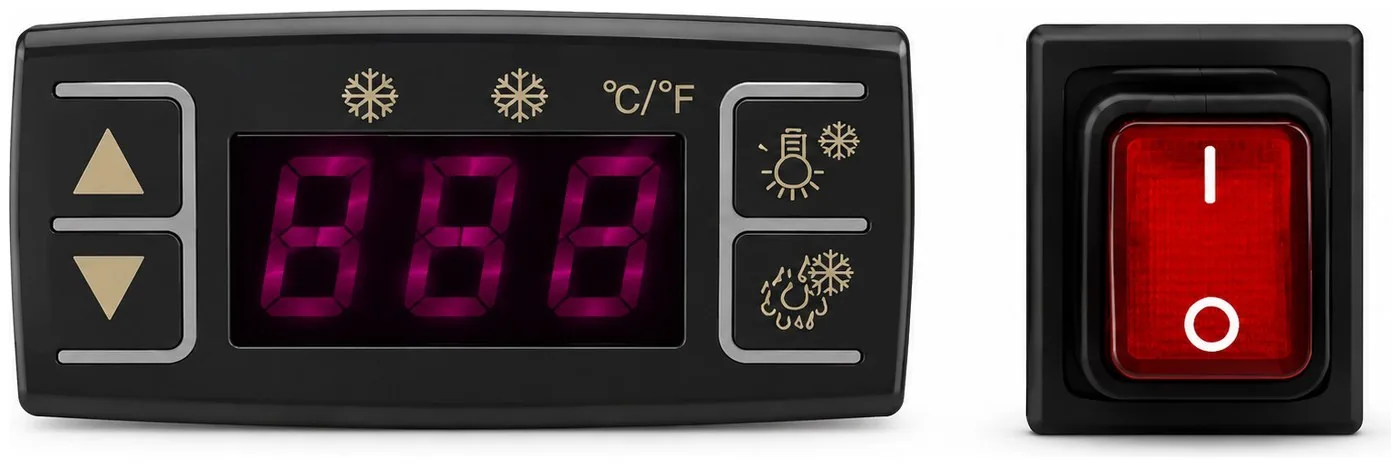
Power switch
The illuminated red rocker switch turns the unit on and off – I for on, O for off. Allow a 5 minute interval before restarting the unit after powering it down.
Change Set Temperature
- Press and hold the Set button for 2 seconds. This will show the current set point.
- To change that temperature to your desired temperature, push the Up and Down arrows accordingly. Check what you are setting the unit to.
- We recommend the temperature to be set between 2 °C–6 °C.
- Press the Set button again to return to the current temperature display.
Indicator lights
- Refrigerant LED (first snowflake): on while cooling; off once the set temperature is reached; flashes during a delayed start.
- Defrost LED (second snowflake): on during defrost; off when finished; flashes during a delayed defrost.
- °C / °F: shows the unit the temperature is displayed in.
Interior light and manual defrost
Press the Light button (lamp icon) once to turn the interior LEDs on; press it again to turn them off. Press and hold the Light button for 6 seconds to start a manual defrost. Holding it again pauses the cycle; otherwise it ends automatically. Defrost water drains to the tray, where it evaporates.
Loading the display
- Let the unit reach temperature before loading stock.
- Do not block the air vents or overfill the shelves.
- Keep the doors closed except when restocking.
Controller reset
If the display shows “Disorder”: hold the Down arrow for 2 seconds until it beeps, then hold the Up arrow for 6 seconds until it beeps again. The display flashes for 3 seconds and restores factory settings.
05Tips and Tricks
Follow these tips to get the best performance, efficiency and lifespan from the cold display.
Transportation
- Never tilt the unit more than 45° during transport or moving.
- Allow it to stand for 12 hours before switching on, so the refrigerant can settle.
- Protect the power cord during transportation.
Drain tray
- Defrosting is automatic; drain water collects in the tray and evaporates automatically.
Shelves
- Adjust the shelves to suit the items on display.
- Each shelf has a maximum load of 18 kg.
Maintenance
- Have a qualified technician service the unit regularly.
- Clean the condenser and evaporator regularly (remove the rear panel to clear dust). Neglecting this shortens the lifespan and may void the warranty.
06Specifications
| Specification | CDC-120C | CDC-160C | CDC-200C |
|---|---|---|---|
| Capacity | 120 L | 160 L | 200 L |
| External W×D×H | 700 × 570 × 690 | 870 × 570 × 690 | 1210 × 570 × 690 |
| Internal W×D×H | 640 × 490 × 380 | 830 × 490 × 380 | 1180 × 490 × 380 |
| Temperature range | 2 – 6 °C | 2 – 6 °C | 2 – 6 °C |
| Shelves | 2 | 2 | 2 |
| Glass front | Curved | Curved | Curved |
| Access | Rear sliding | Rear sliding | Rear sliding |
| Power input | 215 W | — | 360 W |
| Weight | 57 kg | 66 kg | 92 kg |
| Max ambient temp. | 30 °C | 30 °C | 30 °C |
Figures from borrelli.com.au. CDC-160C power input is not published — confirm before print.
07Before Requesting Service
Please check the following if you encounter a problem. If it continues after these checks, contact Borrelli.
| Problem | What to check |
|---|---|
| No refrigeration | Is the power supply interrupted? Is the power cord securely connected? Is a fuse blown or the breaker tripped? |
| Inadequate refrigeration | Is the temperature setting appropriate? Is anything obstructing the air inlet or outlet? Are stored items packed too tightly? Is the door frequently opened or left ajar? |
| Excessive noise | Are all the feet in firm contact with the floor? Is the back of the unit touching the wall? Are other objects resting on it? |
08Warranty and Enquiries
Warranty periods vary by product. For the period that applies to your model, see its product page. For the warranty terms and how to make a claim, see our Terms & Conditions. Keep your proof of purchase, as it may be required.